YFORGE / SETUP GUIDES
Frame Rate Explained: What FPS Means for Gaming
Frame rate explained for gamers: what FPS means, how it differs from refresh rate, which targets make sense (60, 120, 144) and what really limits your PC.
YForge Gaming · November 25, 2026 · AI-assisted guide
Frame rate is the number of images your game draws every second, measured in frames per second (FPS). A higher number means smoother motion and a screen that reacts sooner to what you press. But the number alone does not tell you how a game will feel: steadiness, your monitor and the hardware behind the game matter just as much. At YForge we build gaming PCs around the games you actually play, and the reasoning below is the same one that should guide any build or upgrade.
TL;DR
- Frame rate (FPS) is how many frames your PC draws per second. Refresh rate (Hz) is how many times your monitor shows a new image per second. You need both to be high to see the benefit.
- 60 FPS is the common target, 120 to 144 FPS suits fast online games on a matching monitor, and gains for aim and reaction level off at around 90 FPS in one major study.
- A steady frame rate often feels better than a higher one that keeps dipping. Look at 1% lows, not just the average.
- Your graphics card, CPU and RAM all shape frame rate, so the right build depends on the games and the monitor you plan to use.
Table of Contents
- What frame rate actually means
- Why a higher frame rate feels better
- Frame rate vs. refresh rate
- What is a good frame rate for gaming?
- Why the average number can fool you
- What decides your frame rate
- Matching a PC to the frame rate you want
- Build for the frame rate you want
- FAQ
- Sources
What frame rate actually means
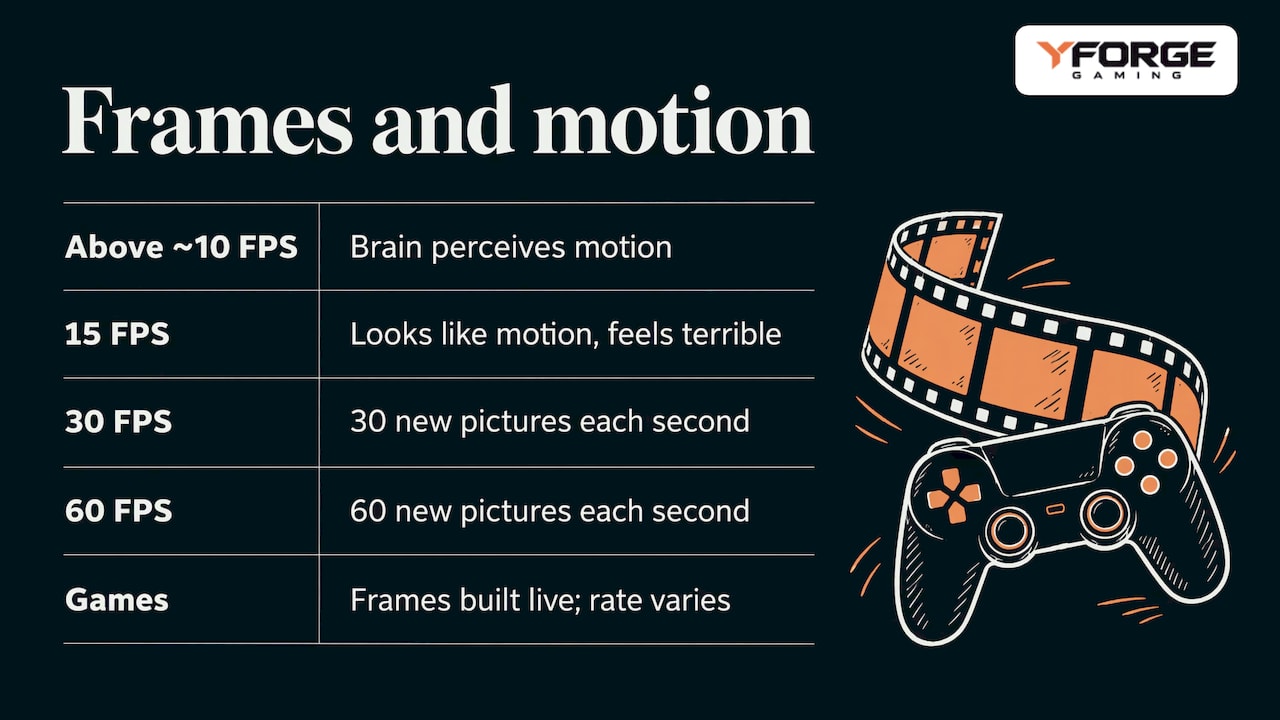
A game is a slideshow played very fast. Each frame is a snapshot of the game world, and showing them in rapid succession creates the illusion of motion. Unity’s beginner guide puts it plainly: a game running at 30 fps shows 30 new pictures each second, and at 60 fps it shows 60.
In a game, your graphics processor (the GPU, the part that renders images) does the drawing, so frame rate is mostly a measure of how fast your PC can finish frames. How-To Geek notes that above roughly 10 frames per second the brain stops seeing individual pictures and perceives motion. That is why a game can look like motion at 15 FPS and still feel terrible to play. The goal in gaming is not just “looks like movement” but “feels immediate and smooth.”
The results Google shows for this topic mostly cover video: 24 fps for film, 30 and 60 for recording. Games work differently. A video has a fixed frame rate baked in. A game builds every frame live, so its frame rate rises and falls with how much work the PC has to do at each moment.
Why a higher frame rate feels better
Two things improve as FPS goes up: how the motion looks and how the game responds.
Smoothness. Each frame is a smaller step from the last, so movement looks fluid rather than choppy. Unity’s guide adds that this makes a game feel more responsive, because what you see catches up to what you pressed sooner. Intel’s gaming guide says the same: more frequent screen updates can let you react faster when new enemies and threats appear.
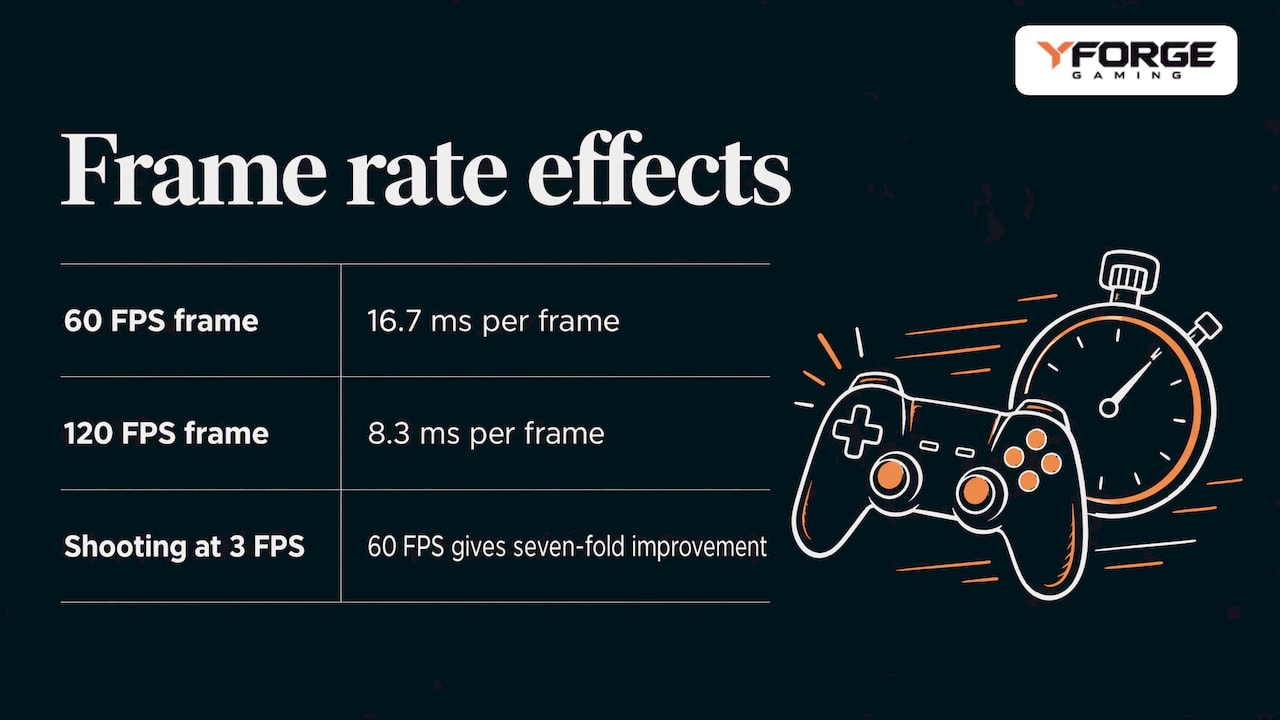
Response time. Each frame takes a fixed slice of time. At 60 FPS that is about 16.7 milliseconds per frame, at 120 FPS about 8.3. Shorter gaps between frames mean the game shows the result of your input sooner. TechTimes describes frame rate as one part of total input lag, which also includes display refresh and system processing.
Which actions benefit most? A Worcester Polytechnic Institute study with nearly 100 users found that precise, rapid actions like shooting are hit hard by low frame rates, while simple movement tolerates lower rates. The same study found 60 fps gave a seven-fold improvement in shooting performance over 3 fps. If you play shooters, battle royale or fighting games, frame rate directly affects your results. If you play slower story games, it affects mostly how pleasant the game looks.
Frame rate vs. refresh rate
These two terms get mixed up constantly, and mixing them up leads to wasted money.
- FPS is the rate at which your PC, especially the GPU, completes frames.
- Refresh rate (Hz) is the rate at which your monitor shows those frames.
NVIDIA’s GeForce team explains that FPS changes with scene complexity (a big explosion takes longer to render than an empty hallway), while a monitor’s refresh rate is generally constant. Think of FPS as a rolling average of how many frames the GPU finishes each second.
The practical rule: your screen is the ceiling. Intel says that on a 60Hz display you won’t see benefits above 60 FPS, while a 144Hz display shows immediate onscreen benefits from higher frame rates. Intel’s refresh rate explainer adds that three parts have to cooperate: a fast monitor, a CPU quick enough to feed the game’s instructions, and a GPU quick enough to execute them. If your GPU only delivers 30 FPS, a 144Hz monitor’s extra speed goes unused. Intel also recommends matching frame rate to refresh rate 1:1, such as 144 FPS on a 144Hz monitor, while noting that playing at 110Hz is still better than 60Hz.
Screen tearing and why matching matters
When the two rates are out of step, you may see screen tearing, where the image looks mismatched horizontally. How-To Geek says VSync, G-Sync and FreeSync (features that sync the display with the GPU) make tearing less likely, and that 60 FPS on a 60Hz display is a good compromise for most PC gamers.
Why some frame rates look uneven
Unity points out a subtler issue. If the frame rate does not divide evenly into the refresh rate, some frames stay on screen longer than others, which looks like stutter even when the average seems fine. Its example: 40 fps works well on a 120Hz display because every frame lasts exactly three refreshes. A 60Hz screen also cannot show more than 60 new frames per second, so a 120 fps target only pays off on a 120Hz display.
What is a good frame rate for gaming?
There is no single answer, because it depends on the game, the screen and what you want from it. These are the targets that come up most, using the ranges from Unity’s guide and PC Gamer’s graphics explainer:
| Target | Typical use | What to expect |
|---|---|---|
| 30 FPS | Console quality modes, slower single-player games | Widely accepted as the minimum for playable |
| 60 FPS | Default for fast action and competitive genres; 1080p/60 is the most common goal | Smooth for most players |
| 72 to 90 FPS | VR headsets | Some standalone platforms require at least 72 |
| 120 to 144 FPS | Fast online games on a high-refresh monitor | Noticeably more fluid, needs a matching 120 to 144Hz screen |
PC Gamer calls a 120 to 144Hz monitor with a matching frame rate ideal. If you are buying your first gaming PC on a budget, 60 FPS at 1080p is a sensible and achievable goal. If you play competitively, aim for the refresh rate of your monitor and build around it.
Do 60, 90 and 120 FPS differ in results?
This is the question behind “Is 120 FPS better than 60?” A 2026 ACM study of 44 players tested frame rates from 7 to 500 in a custom first-person shooter. Player score and accuracy improved sharply from the lowest rates but leveled out after about 90 FPS. Perceived smoothness, however, kept improving all the way to 500. Higher frame rates also let players see events, like an opponent stepping out from cover, earlier.
In short: going from 60 to 120 is a real, visible upgrade in feel, and the measurable performance gain is largest below about 90. Beyond that, you are buying smoothness and a small latency edge. Whether that is worth it depends on how much you play and how competitive you are.
Why the average number can fool you
Two PCs can both report “90 FPS average” and feel completely different. The reason is consistency.
Unity’s guide stresses that players notice change more than the number. Late-arriving frames show up as hitches and stutters even when the average looks great, and a steady 30 fps can feel smoother than a 60 fps that keeps dipping. An ACM study of 33 players backs this up: average frame rate alone was a poor predictor of quality of experience, and variation hurt even at high averages. The best predictor was the 95% frame rate floor, which is the frame rate you stay above 95% of the time (the bottom 5% of frame rates).
When you look at benchmarks or measure your own games, watch two numbers:
- Average FPS, the headline figure.
- 1% lows, the frame rate during the slowest moments. A big gap between the average and the 1% lows points to occasional hitches.
If your games run at a decent average but feel rough, that gap is usually the culprit. We cover the common causes in our guide to PC game stuttering and how to fix it.
What decides your frame rate
Every frame is assembled from geometry, textures, lighting and effects. Intel explains that the graphics card, CPU and RAM all work together to build each one. That means frame rate is a result of the whole system, not one part.
- GPU. Resolution, shadows, ray tracing and effects mostly load the graphics card. Raise the resolution from 1080p to 1440p or 4K and the GPU has far more pixels to fill. Intel notes that many PCs struggle to reach 144 FPS at native 4K.
- CPU. Game logic, physics, crowds and AI run here. A weak CPU can hold back a strong GPU, especially in big, busy games and at high frame rates.
- Video memory (VRAM). High-resolution textures need room. Running short can cause stutter. Our explainer on how much graphics card VRAM you need walks through it.
- Monitor. It decides how many of those frames you can actually see.
Quick settings that raise frame rate
If a game runs below your target, the usual levers are these, from biggest effect to smallest:
- Lower the resolution or the render resolution scale.
- Turn down ray tracing, shadows and reflections.
- Turn on an upscaler such as DLSS, FSR or XeSS, which render the game at a lower resolution and scale it up.
- Cap your frame rate slightly below your monitor’s refresh rate if you see inconsistent pacing.
- Close background apps and overlays you do not need.
To tell which part is limiting you, check utilization while playing. A GPU sitting near full load means the graphics card is the bottleneck, so lower resolution and heavy effects. A busy CPU core with a GPU that has room to spare points to the CPU, so lower view distance, crowd density and physics. Test the same scene before and after each change, so you know what actually helped.
Matching a PC to the frame rate you want
Here is where frame rate turns into a buying decision. Work backward from three questions:
- Which games do you play? A competitive shooter at 1080p asks for something very different from a visually heavy single-player game at 4K.
- What is your monitor’s refresh rate? A 60Hz screen caps what you will see at 60 FPS. A 144Hz screen gives you room to use a stronger GPU.
- What is your budget? Spend on the part that limits your target. Pairing a high-end GPU with a 60Hz monitor, or a premium monitor with an entry-level GPU, wastes money.
A few examples of how that plays out:
- First-time gamer on a tight budget. Aim for 1080p at 60 FPS on a 60Hz or 144Hz monitor. Our first gaming PC checklist starts from the games, which is the right place.
- Esports player. Prioritize a high-refresh monitor and a PC that holds frame rates steady. Consistent frame times matter more than a peak number.
- Enthusiast. Choose individual parts around your resolution and refresh target. Our guide to prebuilt PC customization shows what can be changed.
If you want to see how pricing falls across tiers, read our breakdown of custom gaming computer cost.
Build for the frame rate you want
YForge is a U.S.-based company that builds custom gaming PCs. You can pick a complete desktop build based on your budget or customize individual components, and we assemble and test each PC. Our computers start from $1,000, and the gaming PCs under $1,000 page is a good place to look if you are matching a 1080p, 60 FPS goal to a budget.

If you already know your monitor and your games, you can browse the YFORGE Computers lineup and choose the build that fits your target. Because every build can be configured to your specifications, you can put the money into the GPU, CPU or memory that will move your frame rate most. We also make gaming desks, from $499, so your setup is comfortable for long sessions.
FAQ
Is 60 FPS better than 90 FPS?
No, 90 FPS is higher and shows more frames, but only if your monitor can display them. On a 60Hz screen you will not see anything above 60 FPS. On a 90Hz or faster display, 90 FPS feels smoother and responds a little sooner. In the 44-player study above, performance gains leveled out after about 90 FPS.
Is 120 FPS better than 60 FPS?
Yes, if you have a 120Hz or faster monitor and your PC can hold 120 FPS steadily. Motion looks more fluid and the game responds faster. If your frame rate swings widely, a steady 60 can feel better than a 120 that keeps dropping.
Does a higher refresh rate monitor raise my FPS?
No. The monitor only displays the frames your PC produces. Your GPU and CPU decide the FPS, and the monitor decides how many of those frames you can see. You need both to be fast.
What is a good frame rate for gaming?
For most players, 60 FPS is the common target. Fast online games feel noticeably better at 120 to 144 FPS on a matching monitor. Slower single-player games are fine at 30 to 60. Whatever the number, a steady frame rate matters more than a high average with big dips.
How do I check my frame rate?
Most modern games have a built-in FPS counter in the settings menu, and graphics driver overlays can show it too. Look at the average and the 1% lows, and compare the same game scene before and after any change.
Sources
- What is Frame Rate in Video Games? A Beginner’s Guide to fps (Unity)
- FPS vs. Refresh Rate: What Are the Differences? (How-To Geek)
- How to Fix Your Low Frame Rate (Intel)
- How Frame Rates Affect Gaming Experience (TechTimes)
- On frame rate and player performance in first person games (WPI)
- Why Does High FPS Matter For Esports? (NVIDIA GeForce News)
- What Is Refresh Rate and Why Is It Important? (Intel)
- PC graphics options explained (PC Gamer)
- Effects of Frame Rates up to 500 Hz on First Person Shooter Players (ACM)
- The Effects of Frame Rate Variation on Game Player Quality of Experience (ACM)
Recommended
THE COMMUNITY
Join the conversation.
Have a question or an idea? Share it with the community.
Loading discussion…