YFORGE / SETUP GUIDES
Anime Gaming PC Build: Parts, Budget and Setup Guide
Plan an anime gaming PC build: the parts that matter, what $1,000 buys in 2026, case and lighting choices, first-boot checks and a matching desk.
YForge Gaming · November 26, 2026 · AI-assisted guide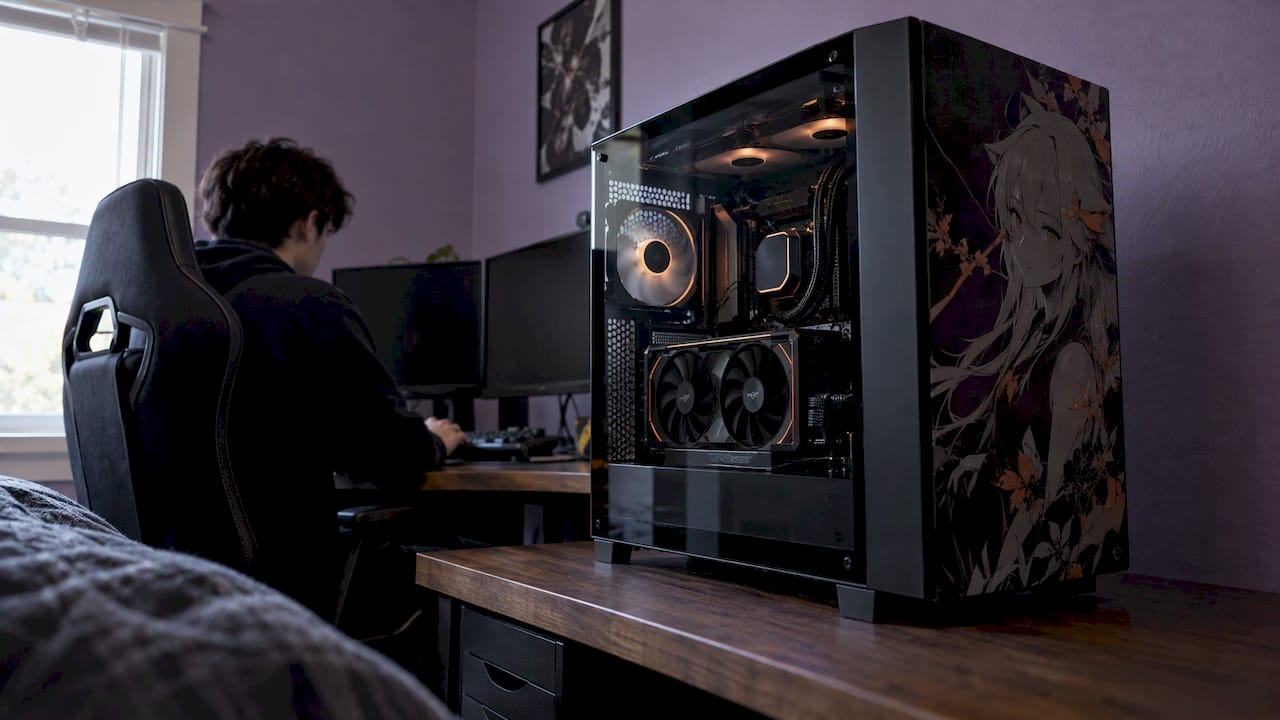
A good anime gaming PC is two projects in one: a machine that runs your games at the resolution and frame rate you want, and a look that makes the desk feel like yours. Get the first right and the second is easy to add. Get it wrong and you own a beautiful case with a graphics card that stutters. At YForge we build custom gaming PCs from $1,000, either as a complete build chosen by budget or as a configuration where you pick the components, so the hard choices below are made around your games, not around a template.
TL;DR
- Start with your games, your monitor’s resolution and your budget. Every other part follows from those three.
- Balance matters more than any single spec: pair the graphics card with a CPU that will not hold it back, and size the power supply with headroom.
- In 2026 a new-parts build at $1,000 is tight, so decide early where to spend and where to save.
- Theme with the case, lighting, desk mat and desk. White parts and extras can cost $200 to $300 more, so spend on looks after performance is settled.
- Keep airflow clear when you add panels, wraps and art, and check temperatures after every change.
Table of Contents
- Start with the games, not the aesthetic
- The parts that matter, in the order to choose them
- What $1,000 buys in 2026
- Making it look anime without hurting performance
- Building it: assembly and first boot
- The desk is half the setup
- Get the PC and the desk from one place
- A simple plan to follow
- FAQ
- Sources
Start with the games, not the aesthetic
Anime games range widely. A gacha RPG or a visual novel runs on modest hardware. A modern action RPG at high refresh rates asks far more of the graphics card. Intel’s gaming PC build guide recommends making a compatible parts list before you buy anything and checking the recommended system requirements of the games you actually play.
Then set your target. Pick a resolution (1080p, 1440p) and a refresh rate (60Hz, 144Hz), because the graphics card has to push enough frames for that screen. A 1080p, 144Hz monitor needs a very different card from a 1440p panel.
Three questions settle most of the plan:
- Which three games will you play most, and what do their recommended specs say?
- What monitor do you own or plan to buy?
- What is the total budget, including the desk and extras?
Write the answers down first. They stop the common first-build mistake of paying for white RGB parts and then discovering the budget has nothing left for the GPU.
The parts that matter, in the order to choose them
A gaming PC needs a CPU, graphics card (GPU), motherboard, memory (RAM), storage, power supply (PSU), cooling, a case and an operating system, according to Intel’s guide. Here is how to think about each one.
| Part | What to aim for | Where it goes wrong |
|---|---|---|
| GPU | The biggest share of the budget, matched to your monitor’s resolution and refresh rate | Buying a card for 4K when you play at 1080p |
| CPU | A midrange Core i5 or Ryzen 5 is usually adequate for gaming | Pairing a high-end GPU with a weak CPU |
| Motherboard | Matching CPU socket and chipset, plus the headers you need for lighting | Buying a board whose socket does not fit the chip |
| RAM | 16GB at minimum, two matched sticks for dual-channel | One stick, or memory faster than the platform supports |
| Storage | A 1TB NVMe SSD as a practical start | A small drive that fills with a few big games |
| PSU | Wattage with headroom, from a unit with proper protections | Saving money on the one part that feeds everything |
| Case | Fits the board size, GPU length and cooler height | A stylish case that traps heat |
Keep the build balanced
Make magazine’s build-a-PC guide advises against pairing a high-end GPU with a lower-end CPU, and says CPU choice should follow your use: high-fidelity gaming at lower refresh rates, competitive high-refresh play, or streaming and editing. The same guide says midrange Core i5 and Ryzen 5 chips are usually enough for gaming, so there is rarely a reason to overspend there.
Memory and storage
Intel states that modern gaming needs at least 16GB of RAM, and that RAM faster than your platform supports will simply run slower. Newegg’s guide puts 32GB as the more comfortable choice for new builds, mods and content creation, but 16GB is the practical baseline. If you plan to record or stream, lean to 32GB. Use two matched sticks so memory runs in dual-channel mode. For storage, a 1TB NVMe SSD is a sensible start, and 2TB suits a larger library.
Power supply
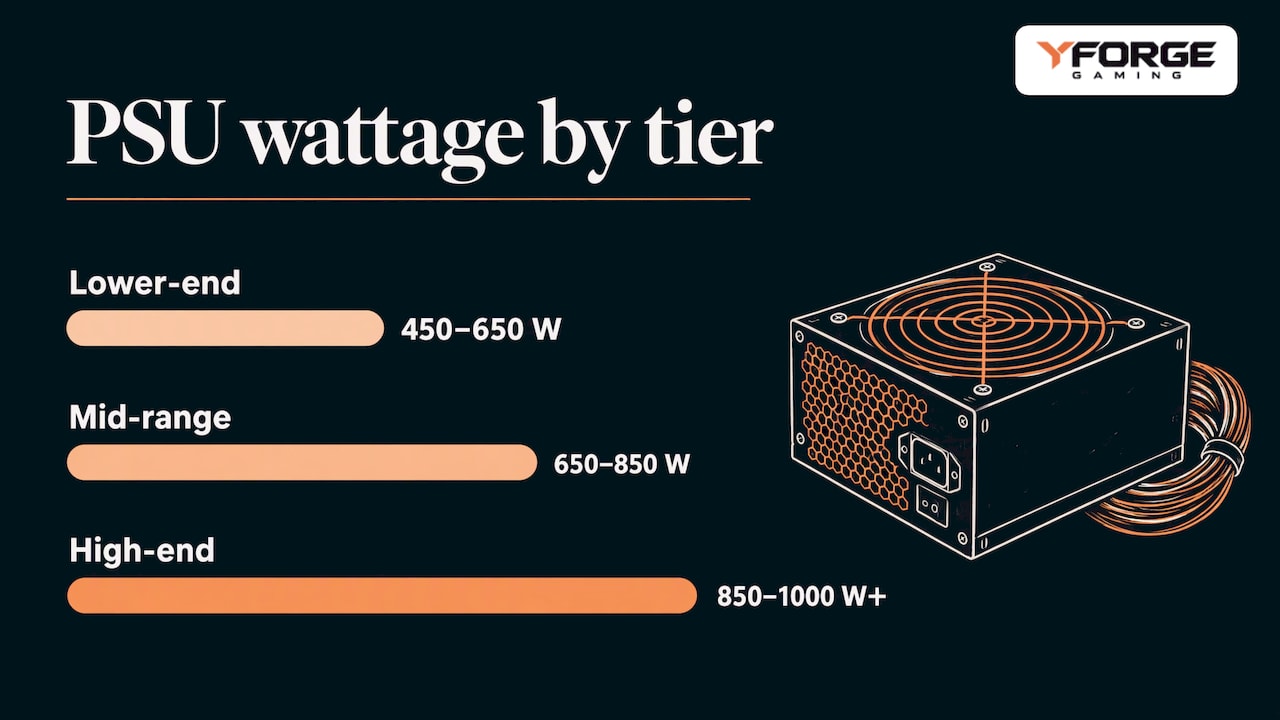
Make’s guide gives rough wattage ranges: 450 to 650W for lower-end systems, 650 to 850W for mid-range, and 850 to 1000W or more for high-end builds. It also warns against cheap PSUs, because a unit without proper protections can put the rest of the system at risk. A PSU wattage calculator, which Intel recommends, takes the guesswork out of sizing.
Compatibility has three dimensions
Parts must fit electrically, physically and in power. A card can fit the slot and still lack the power connector it needs. A board can accept your cooler and lack the lighting header you counted on. Free tools such as Intel’s desktop compatibility checker, which Intel’s guide points to, and PCPartPicker, which Make recommends, catch most conflicts before you order.
What $1,000 buys in 2026
The question “Is $1,000 enough?” has a more cautious answer than it did a few years ago. PCWorld’s February 2026 experiment building a $1,000 gaming PC priced a new-parts list with a Ryzen 5 7600X, RTX 5060 8GB, 32GB of DDR5 and a 1TB SSD at $1,178.80 before tax, close to $1,250 with Pennsylvania sales tax. The author concluded that the $1,000 target fails without sales, used parts or compromises, and noted that prebuilt systems can sometimes cost less because large makers buy inventory at lower prices.
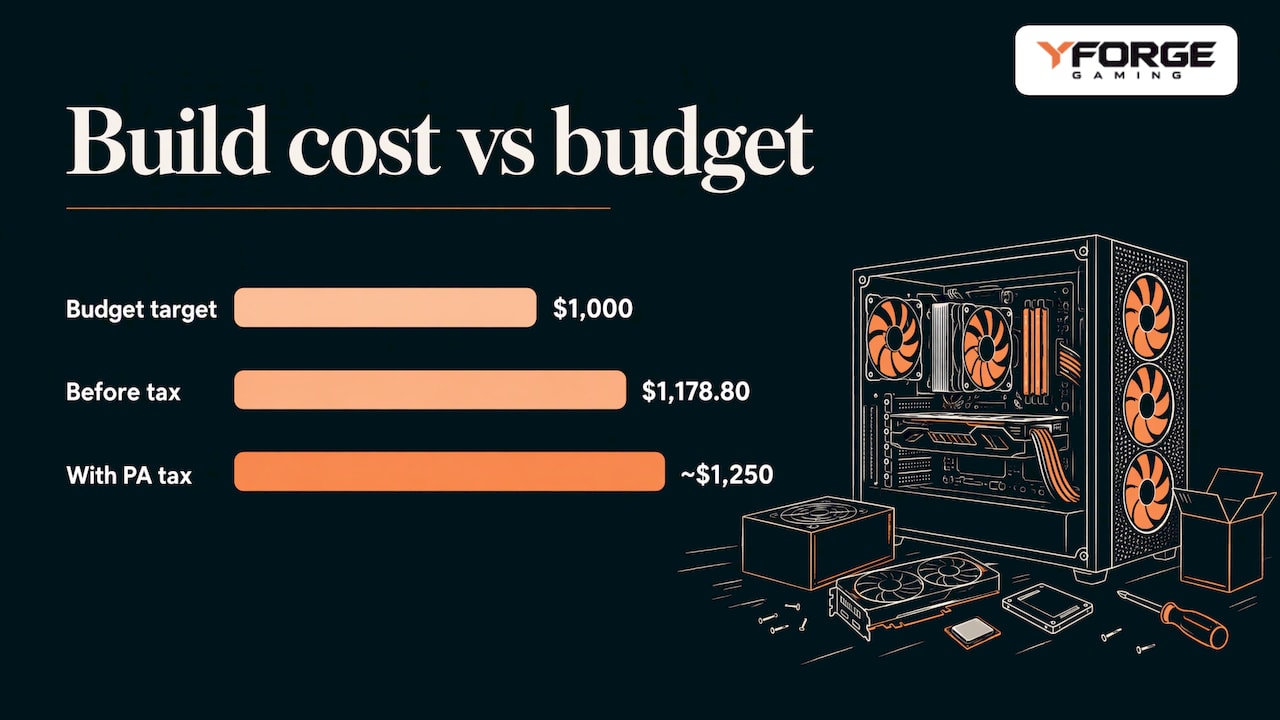
Memory prices and parts availability move month to month, so treat any parts list as a snapshot. What stays true is the tradeoff: at about $1,000 you choose between more RAM, a stronger GPU and a nicer case, and you cannot have all three.
For an anime setup, a sensible order of priority is:
- GPU and CPU first. They set your frame rates.
- 16GB of RAM and a 1TB NVMe drive. Upgrade RAM later if needed, since Intel notes individual components can be upgraded down the road.
- A good case. It has the biggest visual impact on the finished PC.
- Lighting and accessories last. They are the cheapest way to add personality.
This is where a complete build chosen by budget helps a first-time buyer. Our gaming PCs under $1,000 page and our guide on what a custom gaming computer costs at each tier show how the money splits across parts, and our first gaming PC checklist starts from your games.
Making it look anime without hurting performance
PC looks are incremental, not all-or-nothing. How-To Geek’s piece on PC aesthetics says the case makes the biggest visual difference and that LED strips and ARGB fans are the cheapest high-impact upgrades. It also reports that going all-white across the GPU, motherboard, RAM, cooler and PSU can add $200 to $300, money often better spent on a stronger GPU or monitor.
Pick the series, then the case
Decide on the series, palette and mood first: pastel and white for a soft look, black with neon accents for a cyberpunk series, warm tones for a fantasy title. Then choose a case that fits your motherboard size, the length of your GPU and the height of your CPU cooler. A case that looks right but cannot take your card is the most expensive mistake in a themed build. Tempered glass shows off the interior, and fans in the front and bottom with exhaust at the top and rear give consistent airflow, as How-To Geek notes.
Lighting that works with your board
Check which lighting headers your motherboard has before buying strips or fans. LaptopJudge’s anime mod guide warns never to connect a 5V 3-pin ARGB device to a 12V 4-pin RGB header, which can damage the lighting. For accents around the room, LED panels and cabinet-style LED lighting accessories show how a few light sources can frame a display piece without touching the PC’s airflow.
Panels, wraps and art
Custom panels, vinyl and wraps are where airflow often gets blocked. Keep them clear of vents and fan intakes. The Gaming Planet’s anime setup guide suggests at least two intake and two exhaust fans, 3 to 4 inches between the tower and the wall, and a temperature check after any modification. LaptopJudge treats around 80°C as a practical upper limit for the CPU under sustained load. If a mod pushes your temperatures past that, move the art, not the fans.
Building it: assembly and first boot
If you build yourself, the order matters. Tom’s Hardware’s step-by-step PC building guide follows this sequence:
- Install the CPU, aligning the arrow on the chip with the triangle on the socket. Never force it.
- Apply a pea-sized amount of thermal paste and mount the cooler, then plug in its fan header.
- Install the RAM in the slots that enable dual-channel, then add the M.2 SSD.
- Fit the standoffs and I/O shield, then mount the motherboard.
- Install the PSU and route the 24-pin and CPU power cables.
- Seat the GPU in the top PCIe x16 slot and connect its power cables.
- Connect the front-panel headers before the first power-on.
For the first boot, plug your monitor into the GPU, not the motherboard. Make’s guide has you enter the BIOS (usually with the Delete key) to confirm the CPU name and temperature, installed RAM and channels, the boot drive and that every fan is detected and spinning. RAM will show slower speeds until you enable XMP or EXPO in the BIOS. After installing the operating system and drivers, stress-test the system while watching CPU temperature, as Tom’s Hardware advises.
This is the stage where a first-time builder is most likely to lose a weekend: a bent socket pin, a missing power cable, a fan header that was never connected. When we build a PC at YForge, we assemble and test it before it ships, so the first power-on is the one where you load your games.
The desk is half the setup
An anime PC sitting on a mismatched desk undercuts the whole look, and a desk that is too small or the wrong height makes long sessions uncomfortable. The Gaming Planet notes standard gaming desks run 48 to 60 inches wide and recommends a 24 to 27 inch monitor at 144Hz or higher. It also puts a starter anime accessory tier, covering a desk mat, RGB lighting, wall art, basic peripherals and extras, at $200 to $350.
For ergonomics, a few rules hold for everyone, from a first-timer to an esports player:
- Put the top of the monitor at or slightly below eye level.
- Keep your keyboard and mouse at elbow height, with forearms relaxed.
- Give the tower room to breathe, with 3 to 4 inches from the wall.
- Choose a chair with adjustable lumbar support. Premium examples exist: Tom’s Guide lists a Herman Miller and Logitech G gaming chair at $930 in its office chair roundup, with a 350-pound weight limit and a 12-year warranty.
Our gaming desk size guide and layout planner helps you map the desk before you buy, and the guide on designing an anime-inspired gaming desk covers artwork and layout. If your problem is clutter rather than space, see our ideas for an anime gaming setup without clutter.
Get the PC and the desk from one place
YForge builds custom gaming PCs from $1,000. You can pick a complete desktop build by budget or customize individual components, and we assemble and rigorously test each PC. Orders are processed after payment and delivered nationwide. For the desk, our YGAMERDESK line starts at $499, and a fully custom gaming desk is $799, with original artwork and ergonomic designs. You can see the PCs and desks in our store, browse our anime-inspired gaming desks, or look at the custom gaming desk.

If you are in Massachusetts and want the whole room themed, our game room services include wallpaper, wood panels and LED, and themed rooms. Our free 3D room planner lets you lay out walls, LEDs and cutouts first.
A simple plan to follow
- List your three main games and their recommended specs.
- Set your monitor resolution and refresh rate.
- Set a total budget, then reserve the largest share for the GPU.
- Choose a balanced CPU, 16GB or more of RAM and a 1TB NVMe drive.
- Pick a case that fits your parts and keeps airflow open.
- Add lighting, a desk mat and art, then check temperatures.
- Match the desk to the PC so the setup reads as one piece.
For more ideas on layout, our bedroom gaming setup guide covers small spaces and budgets.
FAQ
Is $1,000 enough to build an anime gaming PC?
It can be, but 2026 parts prices make it tight. PCWorld’s February 2026 test of a new-parts list came to $1,178.80 before tax. Plan to prioritize the GPU, CPU, 16GB of RAM and a 1TB SSD, then add lighting and theming over time. Our PCs start at $1,000.
How much RAM does an anime gaming PC need?
Intel says modern gaming needs at least 16GB of RAM. Choose 32GB if you also stream, record or mod games. Use two matched sticks so memory runs in dual-channel mode.
Will theming my PC hurt performance?
Not if you protect airflow. Keep panels, wraps and art away from vents, use at least two intake and two exhaust fans, and leave 3 to 4 inches between the tower and the wall. Check temperatures after each change.
Which parts should I buy first?
Buy the GPU and CPU first, because they decide your frame rates. Storage and RAM follow, since they can be upgraded later. Lighting and accessories come last, because they are the cheapest way to change the look.
Sources
- How to Build a Gaming PC: Parts and Setup Guide, Intel
- Build a PC From Scratch, Make:
- How to build a $1,000 gaming PC in 2026, PCWorld
- How to build a PC, Tom’s Hardware
- PC aesthetics piece, How-To Geek
- Anime themed PC build mod guide, LaptopJudge
- Anime Gaming Setup Guide, The Gaming Planet
- Best office chairs of 2026, Tom’s Guide
Recommended
THE COMMUNITY
Join the conversation.
Have a question or an idea? Share it with the community.
Loading discussion…